


Adminer - Extensions
Both Adminer and Editor offers support for extensions. It is possible to overwrite some default Adminer functionality by a custom code. All you need is to define the adminer_object function which returns an object extending the basic Adminer\Adminer class. Then just include the original adminer.php or editor.php:
<?php
function adminer_object() {

  class AdminerSoftware extends Adminer\Adminer {

    function name() {
      // custom name in title and heading
      return 'Software';
    }

    function permanentLogin() {
      // key used for permanent login
      return 'ade87512a413073e451afcd40b58e50e';
    }

    function credentials() {
      // server, username and password for connecting to database
      return array('localhost', 'ODBC', '');
    }

    function database() {
      // database name, will be escaped by Adminer
      return 'software';
    }

    function login($login, $password) {
      // validate user submitted credentials
      return ($login == 'admin' && $password == 'g8jq6y3R');
    }

    function tableName($tableStatus) {
      // tables without comments would return empty string and will be ignored by Adminer
      return Adminer\h($tableStatus['Comment']);
    }

    function fieldName($field, $order = 0) {
      // only columns with comments will be displayed and only the first five in select
      return ($order <= 5 && !preg_match('~_(md5|sha1)$~', $field['field']) ? Adminer\h($field['comment']) : '');
    }

  }

  return new AdminerSoftware;
}

include './editor.php';
To create an Adminer Editor customization for other drivers than MySQL, you have to define own loginForm method and fill the auth[driver] field value by your driver (pgsql, sqlite, ...).
You usually also need to implement the database method.
Example: editor/sqlite.php.
Adminer also supports plugins which are ready to use extensions.
API reference
Everything is inside the namespace Adminer. Type aliases
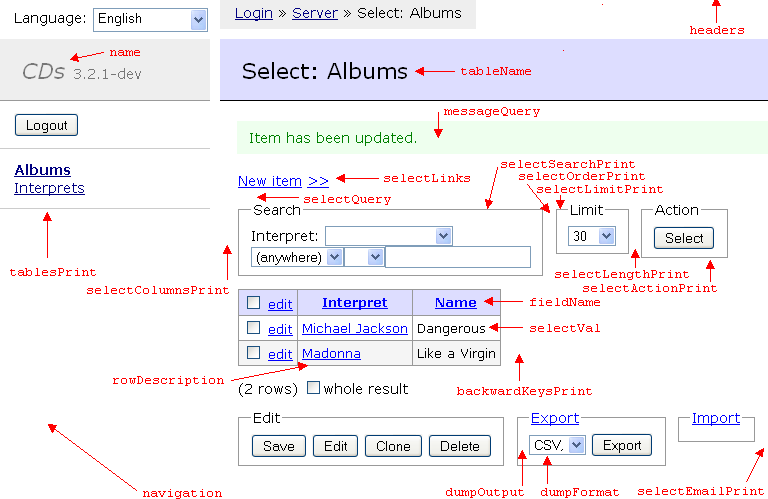
The object can overwrite following methods:
- string Adminer::name() - Name in title and navigation
- array{string, string, string} Adminer::credentials() - Connection parameters
- string[]|void Adminer::connectSsl() - Get SSL connection options
- string Adminer::permanentLogin(bool $create) - Get key used for permanent login
- string Adminer::bruteForceKey() - Return key used to group brute force attacks; behind a reverse proxy, you want to return the last part of X-Forwarded-For
- string Adminer::serverName(?string $server) - Get server name displayed in breadcrumbs
- ?string Adminer::database() - Identifier of selected database
- list<string> Adminer::databases(bool $flush) - Get cached list of databases
- void Adminer::pluginsLinks() - Print links after list of plugins
- list<string> Adminer::operators() - Operators used in select
- list<string> Adminer::schemas() - Get list of schemas
- float Adminer::queryTimeout() - Specify limit for waiting on some slow queries like DB list
- void Adminer::afterConnect() - Called after connecting and selecting a database
- void Adminer::headers() - Headers to send before HTML output
- list<string[]> Adminer::csp(list<string[]> $csp) - Get Content Security Policy headers
- bool Adminer::head(bool $dark) - Print HTML code inside <head>
- void Adminer::bodyClass() - Print extra classes in <body class>; must start with a space
- string[] Adminer::css() - Get URLs of the CSS files
- void Adminer::loginForm() - Print login form
- string Adminer::loginFormField(string $name, string $heading, string $value) - Get login form field
- mixed Adminer::login(string $login, string $password) - Authorize the user
- string Adminer::tableName(TableStatus $tableStatus) - Table caption used in navigation and headings
- string Adminer::fieldName(Field|RoutineField $field, int $order) - Field caption used in select and edit
- void Adminer::selectLinks(TableStatus $tableStatus, ?string $set) - Print links after select heading
- ForeignKey[] Adminer::foreignKeys(string $table) - Get foreign keys for table
- BackwardKey[] Adminer::backwardKeys(string $table, string $tableName) - Find backward keys for table
- void Adminer::backwardKeysPrint(BackwardKey[] $backwardKeys, string[] $row) - Print backward keys for row
- string Adminer::selectQuery(string $query, float $start, bool $failed) - Query printed in select before execution
- string Adminer::sqlCommandQuery(string $query) - Query printed in SQL command before execution
- void Adminer::sqlPrintAfter() - Print HTML code just before the Execute button in SQL command
- string Adminer::rowDescription(string $table) - Description of a row in a table
- list<string[]> Adminer::rowDescriptions(list<string[]> $rows, list<ForeignKey>[] $foreignKeys) - Get descriptions of selected data
- string|void Adminer::selectLink(string $val, Field $field) - Get a link to use in select table
- string Adminer::selectVal(?string $val, ?string $link, Field $field, string $original) - Value printed in select table
- ?string Adminer::editVal(?string $val, Field $field) - Value conversion used in select and edit
- string[] Adminer::config() - Get configuration options for AdminerConfig
- void Adminer::tableStructurePrint(Field[] $fields, TableStatus $tableStatus) - Print table structure in tabular format
- void Adminer::tableIndexesPrint(Index[] $indexes, TableStatus $tableStatus) - Print list of indexes on table in tabular format
- void Adminer::selectColumnsPrint(list<string> $select, string[] $columns) - Print columns box in select
- void Adminer::selectSearchPrint(list<string> $where, string[] $columns, Index[] $indexes) - Print search box in select
- void Adminer::selectOrderPrint(list<string> $order, string[] $columns, Index[] $indexes) - Print order box in select
- void Adminer::selectLimitPrint(int $limit) - Print limit box in select
- void Adminer::selectLengthPrint(numeric-string $text_length) - Print text length box in select
- void Adminer::selectActionPrint(Index[] $indexes) - Print action box in select
- bool Adminer::selectCommandPrint() - Print command box in select
- bool Adminer::selectImportPrint() - Print import box in select
- void Adminer::selectEmailPrint(string[] $emailFields, string[] $columns) - Print extra text in the end of a select form
- list<list<string>> Adminer::selectColumnsProcess(string[] $columns, Index[] $indexes) - Process columns box in select
- list<string> Adminer::selectSearchProcess(Field[] $fields, Index[] $indexes) - Process search box in select
- list<string> Adminer::selectOrderProcess(Field[] $fields, Index[] $indexes) - Process order box in select
- int Adminer::selectLimitProcess() - Process limit box in select
- numeric-string Adminer::selectLengthProcess() - Process length box in select
- bool Adminer::selectEmailProcess(string[] $where, list<ForeignKey>[] $foreignKeys) - Process extras in select form
- string Adminer::selectQueryBuild(list<string> $select, list<string> $where, list<string> $group, list<string> $order, int $limit, int $page) - Build SQL query used in select
- string Adminer::messageQuery(string $query, string $time, bool $failed) - Query printed after execution in the message
- void Adminer::editRowPrint(string $table, Field[] $fields, mixed $row, ?bool $update) - Print before edit form
- string[] Adminer::editFunctions(Field|array{null:bool} $field) - Functions displayed in edit form
- string Adminer::editInput(?string $table, Field $field, string $attrs, string|string[]|false|null $value) - Get options to display edit field
- string Adminer::editHint(?string $table, Field $field, ?string $value) - Get hint for edit field
- string Adminer::processInput(Field $field, string $value, ?string $function) - Process sent input
- string[] Adminer::dumpOutput() - Return export output options
- string[] Adminer::dumpFormat() - Return export format options
- void Adminer::dumpDatabase(string $db) - Export database structure
- void Adminer::dumpTable(string $table, string $style, int $is_view) - Export table structure
- void Adminer::dumpData(string $table, string $style, string $query) - Export table data
- string Adminer::dumpFilename(string $identifier) - Set export filename
- string Adminer::dumpHeaders(string $identifier, bool $multi_table) - Send headers for export
- void Adminer::dumpFooter() - Print text after export
- string Adminer::importServerPath() - Set the path of the file for webserver load
- bool Adminer::homepage() - Print homepage
- void Adminer::navigation(string $missing) - Print navigation after Adminer title
- void Adminer::syntaxHighlighting(TableStatus[] $tables) - Set up syntax highlight for code and <textarea>
- void Adminer::databasesPrint(string $missing) - Print databases list in menu
- void Adminer::tablesPrint(TableStatus[] $tables) - Print table list in menu
- list<string[]> Adminer::processList() - Get process list
- Result|bool Adminer::killProcess(numeric-string $id) - Kill a process
It is possible to use following functions in namespace Adminer.
- Db connection(?Db $connection2) - Get database connection
- Adminer|Plugins adminer() - Get Adminer object
- Driver driver() - Get Driver object
- ?Db connect() - Connect to the database
- string idf_unescape(string $idf) - Unescape database identifier
- string q(string $string) - Shortcut for connection()->quote($string)
- string escape_string(string $val) - Escape string to use inside ''
- mixed idx(?mixed[] $array, array-key $key, mixed $default) - Get a possibly missing item from a possibly missing array
- numeric-string number(string $val) - Remove non-digits from a string; used instead of intval() to not corrupt big numbers
- string number_type() - Get regular expression to match numeric types
- void remove_slashes(list<array> $process, bool $filter) - Disable magic_quotes_gpc
- string bracket_escape(string $idf, bool $back) - Escape or unescape string to use inside form []
- bool min_version(string|float $version, string|float $maria_db, ?Db $connection2) - Check if connection has at least the given version
- string charset(Db $connection) - Get connection charset
- bool ini_bool(string $ini) - Get INI boolean value
- bool sid() - Check if SID is necessary
- void set_password(string $vendor, ?string $server, string $username, ?string $password) - Set password to session
- string|false|null get_password() - Get password from session
- string|false get_val(string $query, int $field, ?Db $conn) - Get single value from database
- list<string> get_vals(string $query, array-key $column) - Get list of values from database
- string[] get_key_vals(string $query, ?Db $connection2, bool $set_keys) - Get keys from first column and values from second
- list<string[]> get_rows(string $query, ?Db $connection2, string $error) - Get all rows of result
- string[]|void unique_array(string[] $row, Index[] $indexes) - Find unique identifier of a row
- string escape_key(string $key) - Escape column key used in where()
- string where(array{where:string[], null:list<string>} $where, Field[] $fields) - Create SQL condition from parsed query string
- string where_check(string $val, Field[] $fields) - Create SQL condition from query string
- string where_link(int $i, string $column, ?string $value, string $operator) - Create query string where condition from value
- string convert_fields(mixed[] $columns, Field[] $fields, list<string> $select) - Get select clause for convertible fields
- void cookie(string $name, ?string $value, int $lifetime) - Set cookie valid on current path
- mixed[] get_settings(string $cookie) - Get settings stored in a cookie
- mixed get_setting(string $key, string $cookie, mixed $default) - Get setting stored in a cookie
- void save_settings(mixed[] $settings, string $cookie) - Store settings to a cookie
- void restart_session() - Restart stopped session
- void stop_session(bool $force) - Stop session if possible
- mixed &(string $key) - Get session variable for current server
- mixed set_session(string $key, mixed $val) - Set session variable for current server
- string auth_url(string $vendor, ?string $server, string $username, ?string $db) - Get authenticated URL
- bool is_ajax() - Find whether it is an AJAX request
- void redirect(?string $location, ?string $message) - Send Location header and exit
- bool query_redirect(string $query, ?string $location, string $message, bool $redirect, bool $execute, bool $failed, string $time) - Execute query and redirect if successful
- Result|bool queries(string $query) - Execute and remember query
- bool apply_queries(string $query, list<string> $tables, callable(string):string $escape) - Apply command to all array items
- bool queries_redirect(?string $location, string $message, bool $redirect) - Redirect by remembered queries
- string format_time(float $start) - Format elapsed time
- string relative_uri() - Get relative REQUEST_URI
- string remove_from_uri(string $param) - Remove parameter from query string
- mixed get_file(string $key, bool $decompress, string $delimiter) - Get file contents from $_FILES
- string upload_error(int $error) - Determine upload error
- string repeat_pattern(string $pattern, int $length) - Create repeat pattern for preg
- bool is_utf8(?string $val) - Check whether the string is in UTF-8
- string format_number(float|numeric-string $val) - Format decimal number
- string friendly_url(string $val) - Generate friendly URL
- TableStatus table_status1(string $table, bool $fast) - Get status of a single table and fall back to name on error
- list<ForeignKey>[] column_foreign_keys(string $table) - Find out foreign keys for each column
- Field[] fields_from_edit() - Compute fields() from $_POST edit data; used by Mongo and SimpleDB
- string dump_headers(string $identifier, bool $multi_table) - Send headers for export
- void dump_csv(string[] $row) - Print CSV row
- string apply_sql_function(?string $function, string $column) - Apply SQL function
- string get_temp_dir() - Get path of the temporary directory
- resource|void file_open_lock(string $filename) - Open and exclusively lock a file
- void file_write_unlock(resource $fp, string $data) - Write and unlock a file
- void file_unlock(resource $fp) - Unlock and close a file
- mixed first(mixed[] $array) - Get first element of an array
- string password_file(bool $create) - Read password from file adminer.key in temporary directory or create one
- string rand_string() - Get a random string
- string select_value(string|string[] $val, string $link, Field $field, ?numeric-string $text_length) - Format value to use in select
- bool is_blob(Field $field) - Check whether the field type is blob or equivalent
- bool is_mail(?string $email) - Check whether the string is e-mail address
- bool is_url(?string $string) - Check whether the string is URL address
- bool is_shortable(Field $field) - Check if field should be shortened
- array{0: string, 1: string} host_port(string $server) - Split server into host and (port or socket)
- string count_rows(string $table, list<string> $where, bool $is_group, list<string> $group) - Get query to compute number of found rows
- string[] slow_query(string $query) - Run query which can be killed by AJAX call after timing out
- string get_token() - Generate BREACH resistant CSRF token
- bool verify_token() - Verify if supplied CSRF token is valid
HTML helpers:
- string script(string $source, string $trailing) - Return <script> element
- string script_src(string $url, bool $defer) - Return <script src> element
- string nonce() - Get a nonce="" attribute with CSP nonce
- string input_hidden(string $name, string|int $value) - Get <input type="hidden">
- string input_token() - Get CSRF <input type="hidden" name="token">
- string target_blank() - Get a target="_blank" attribute
- string h(?string $string) - Escape for HTML
- string nl_br(string $string) - Convert \n to <br>
- string checkbox(string $name, string|int $value, ?bool $checked, string $label, string $onclick, string $class, string $labelled_by) - Generate HTML checkbox
- string optionlist(string[]|string[][] $options, mixed $selected, bool $use_keys) - Generate list of HTML options
- string html_select(string $name, string[] $options, ?string $value, string $onchange, string $labelled_by) - Generate HTML <select>
- string html_radios(string $name, string[] $options, ?string $value, string $separator) - Generate HTML radio list
- string confirm(string $message, string $selector) - Get onclick confirmation
- void print_fieldset(string $id, string $legend, bool $visible) - Print header for hidden fieldset (close by </div></fieldset>)
- string bold(bool $bold, string $class) - Return class='active' if $bold is true
- string js_escape(string $string) - Escape string for JavaScript apostrophes
- string pagination(int $page, ?int $current) - Generate page number for pagination
- bool hidden_fields(mixed[] $process, list<string> $ignore, string $prefix) - Print hidden fields
- void hidden_fields_get() - Print hidden fields for GET forms
- string enum_input('radio'|'checkbox' $type, string $attrs, Field $field, string|string[]|false|null $value, string $empty) - Print enum or set input field
- void input(Field|RoutineField $field, mixed $value, ?string $function, ?bool $autofocus) - Print edit input field
- mixed process_input(Field|RoutineField $field) - Process edit input field
- void search_tables() - Print results of search in all tables
- string on_help(string $command, int $side) - Return events to display help on mouse over
- void edit_form(string $table, Field[] $fields, mixed $row, ?bool $update, string $error) - Print edit data form
- string shorten_utf8(string $string, int $length, string $suffix) - Shorten UTF-8 string
- string icon(string $icon, string $name, string $html, string $title) - Get button with icon
Language specific functions:
- string lang(literal-string $idf, float|string $number) - Translate string
- string lang_format(string|list<string> $translation, float|string $number) - Format translation, usable also by plugins
- string[] langs() - Get available languages
Driver specific functions:
- bool Db::set_charset(string $charset) - Set the client character set
- Result::__construct( $result) - @param resource $result
- array<?string>|false Result::fetch_assoc() - Fetch next row as associative array
- list<?string>|false Result::fetch_row() - Fetch next row as numbered array
- \stdClass Result::fetch_field() - Fetch next field
- Result::__destruct() - Free result set
- string idf_escape(string $idf) - Escape database identifier
- string table(string $idf) - Get escaped table name
- list<string> get_databases(bool $flush) - Get cached list of databases
- string limit(string $query, string $where, int $limit, int $offset, string $separator) - Formulate SQL query with limit
- string limit1(string $table, string $query, string $where, string $separator) - Formulate SQL modification query with limit 1
- ?string db_collation(string $db, string[][] $collations) - Get database collation
- string logged_user() - Get logged user
- string[] tables_list() - Get tables list
- int[] count_tables(list<string> $databases) - Count tables in all databases
- array<string, TableStatus> table_status(string $name, bool $fast) - Get table status
- bool is_view(TableStatus $table_status) - Find out whether the identifier is view
- bool fk_support(TableStatus $table_status) - Check if table supports foreign keys
- Field[] fields(string $table) - Get information about fields
- Index[] indexes(string $table, ?Db $connection2) - Get table indexes
- ForeignKey[] foreign_keys(string $table) - Get foreign keys in table
- array{select:string} view(string $name) - Get view SELECT
- string[][] collations() - Get sorted grouped list of collations
- bool information_schema(?string $db) - Find out if database is information_schema
- string error() - Get escaped error message
- Result create_database(string $db, string $collation) - Create database
- bool drop_databases(list<string> $databases) - Drop databases
- bool rename_database(string $name, string $collation) - Rename database from DB
- string auto_increment() - Generate modifier for auto increment column
- Result|bool alter_table(string $table, string $name, array $fields, string[] $foreign, ?string $comment, string $engine, string $collation, numeric-string|'' $auto_increment, ?Partitions $partitioning) - Run commands to create or alter table
- Result|bool alter_indexes(string $table, string $alter) - Run commands to alter indexes
- bool truncate_tables(list<string> $tables) - Run commands to truncate tables
- Result|bool drop_views(list<string> $views) - Drop views
- Result|bool drop_tables(list<string> $tables) - Drop tables
- bool move_tables(list<string> $tables, list<string> $views, string $target) - Move tables to other schema
- bool copy_tables(list<string> $tables, list<string> $views, string $target) - Copy tables to other schema
- Trigger trigger(string $name, string $table) - Get information about trigger
- array{string, string}[] triggers(string $table) - Get defined triggers
- array{Timing: list<string>, Event: list<string>, Type: list<string>} trigger_options() - Get trigger options
- Routine routine(string $name, 'FUNCTION'|'PROCEDURE' $type) - Get information about stored routine
- list<string[]> routines() - Get list of routines
- list<string> routine_languages() - Get list of available routine languages
- string routine_id(string $name, Routine $row) - Get routine signature
- string last_id(Result|bool $result) - Get last auto increment ID
- Result explain(Db $connection, string $query) - Explain select
- numeric-string|null found_rows(TableStatus $table_status, list<string> $where) - Get approximate number of rows
- string create_sql(string $table, ?bool $auto_increment, string $style) - Get SQL command to create table
- string truncate_sql(string $table) - Get SQL command to truncate table
- string use_sql(string $database, string $style) - Get SQL command to change database
- string trigger_sql(string $table) - Get SQL commands to create triggers
- list<string[]> show_variables() - Get server variables
- list<string[]> show_status() - Get status variables
- list<string[]> process_list() - Get process list
- string|void convert_field(Field $field) - Convert field in select and edit
- string unconvert_field(Field $field, string $return) - Convert value in edit after applying functions back
- bool support(literal-string $feature) - Check whether a feature is supported
- Result|bool kill_process(numeric-string $id) - Kill a process
- string connection_id() - Return query to get connection ID
- numeric-string max_connections() - Get maximum number of connections
- string[] types() - Get user defined types
- string type_values(int $id) - Get values of user defined type
- list<string> schemas() - Get existing schemas
- string get_schema() - Get current schema
- bool set_schema(string $schema, ?Db $connection2) - Set current schema
Driver:
- void add_driver(string $id, string $name) - Add or overwrite a driver
- ?string get_driver(string $id) - Get driver name
- Driver::__construct(Db $connection) - Create object for performing database operations
- int[] Driver::types() - Get all types
- list<string>[]|list<string> Driver::structuredTypes() - Get structured types
- string|void Driver::enumLength(Field $field) - Get enum values
- string|void Driver::unconvertFunction(Field $field) - Function used to convert the value inputted by user
- Result|false Driver::select(string $table, list<string> $select, list<string> $where, list<string> $group, list<string> $order, int $limit, int $page, bool $print) - Select data from table
- Result|bool Driver::delete(string $table, string $queryWhere, int $limit) - Delete data from table
- Result|bool Driver::update(string $table, string[] $set, string $queryWhere, int $limit, string $separator) - Update data in table
- Result|bool Driver::insert(string $table, string[] $set) - Insert data into table
- string Driver::insertReturning(string $table) - Get RETURNING clause for INSERT queries (PostgreSQL specific)
- Result|bool Driver::insertUpdate(string $table, list<string[]> $rows, int[] $primary) - Insert or update data in table
- Result|bool Driver::begin() - Begin transaction
- Result|bool Driver::commit() - Commit transaction
- Result|bool Driver::rollback() - Rollback transaction
- string|void Driver::slowQuery(string $query, int $timeout) - Return query with a timeout
- string Driver::convertSearch(string $idf, array{op:string, val:string} $val, Field $field) - Convert column to be searchable
- ?string Driver::value(?string $val, Field $field) - Convert value returned by database to actual value
- string Driver::quoteBinary(string $s) - Quote binary string
- string|void Driver::warnings() - Get warnings about the last command
- string|void Driver::tableHelp(string $name, bool $is_view) - Get help link for table
- list<string> Driver::inheritsFrom(string $table) - Get tables this table inherits from
- list<string> Driver::inheritedTables(string $table) - Get inherited tables
- Partitions Driver::partitionsInfo(string $table) - Get partitions info
- bool Driver::hasCStyleEscapes() - Check if C-style escapes are supported
- list<string> Driver::engines() - Get supported engines
- bool Driver::supportsIndex(TableStatus $table_status) - Check whether table supports indexes
- list<string> Driver::indexAlgorithms(TableStatus $tableStatus) - Return list of supported index algorithms, first one is default
- string[] Driver::checkConstraints(string $table) - Get defined check constraints
- array<list<array{field:string, null:bool, type:string, length:?numeric-string}>> Driver::allFields() - Get all fields in the current schema
Db:
- string Db::attach(string $server, string $username, string $password) - Connect to server
- string Db::quote(string $string) - Quote string to use in SQL
- bool Db::select_db(string $database) - Select database
- Result|bool Db::query(string $query, bool $unbuffered) - Send query
- Result|bool Db::multi_query(string $query) - Send query with more resultsets
- Result|bool Db::store_result() - Get current resultset
- bool Db::next_result() - Fetch next resultset
Adminer specific functions:
- string[] print_select_result(Result $result, ?Db $connection2, string[] $orgtables, int|numeric-string $limit) - Print select result
- array<string, Field> referencable_primary(string $self) - Get referencable tables with single column primary key except self
- void textarea(string $name, string|list<array{string}> $value, int $rows, int $cols) - Print SQL <textarea> tag
- string select_input(string $attrs, string[] $options, ?string $value, string $onchange, string $placeholder) - Generate HTML <select> or <input> if $options are empty
- void json_row(string $key, string|int $val, bool $escape) - Print one row in JSON object
- void edit_type(string $key, Field $field, list<string> $collations, string[] $foreign_keys, list<string> $extra_types) - Print table columns for type edit
- string process_length(?string $length) - Filter length value including enums
- string process_type(FieldType $field, string $collate) - Create SQL string from field type
- list<string> process_field(Field $field, Field $type_field) - Create SQL string from field
- string default_value(Field $field) - Get default value clause
- string|void type_class(string $type) - Get type class to use in CSS
- void edit_fields((Field|RoutineField)[] $fields, list<string> $collations, 'TABLE'|'PROCEDURE' $type, string[] $foreign_keys) - Print table interior for fields editing
- bool process_fields(Field[] $fields) - Move fields up and down or add field
- string normalize_enum(list<string> $match) - Callback used in routine()
- Result|bool grant('GRANT'|'REVOKE' $grant, list<string> $privileges, ?string $columns, string $on) - Issue grant or revoke commands
- void drop_create(string $drop, string $create, string $drop_created, string $test, string $drop_test, string $location, string $message_drop, string $message_alter, string $message_create, string $old_name, string $new_name) - Drop old object and create a new one
- string create_trigger(string $on, Trigger $row) - Generate SQL query for creating trigger
- string create_routine('PROCEDURE'|'FUNCTION' $routine, Routine $row) - Generate SQL query for creating routine
- string remove_definer(string $query) - Remove current user definer from SQL command
- string format_foreign_key(ForeignKey $foreign_key) - Format foreign key to use in SQL query
- void tar_file(string $filename, TmpFile $tmp_file) - Add a file to TAR
- int ini_bytes(string $ini) - Get INI bytes value
- string doc_link(string[] $paths, string $text) - Create link to database documentation
- string db_size(string $db) - Compute size of database
- void set_utf8mb4(string $create) - Print SET NAMES if utf8mb4 might be needed
Editor specific functions:
- string email_header(string $header) - Encode e-mail header in UTF-8
- bool send_mail(string $email, string $subject, string $message, string $from, array{error?:list<int>, type?:list<string>, name?:list<string>, tmp_name?:list<string>} $files) - Send e-mail in UTF-8
- bool like_bool(Field $field) - Check whether the column looks like boolean